News and Views From my kids accomplishments, to my heretical perspective of the world

March 26, 2011

Dropbox

Filed under: Computers, Tech & Science — Daryl @ 1:21 pm

I just discovered a very neat application that allows you to easily share files between your computers, phone and friends.

Dropbox can be installed on Windows, Mac, Android and even iPhone (Wow!). You can take a picture with your phone, drop the picture in the Dropbox (or just select “Share” and choose Dropbox), and it appears in the Dropbox folder on your computer. You can designate folders as public, so that anybody can view pictures dropped into those folders.

You can also use Dropbox to share files between your computers, so that it can serve as a backup, or as a painless way to move files between computers.

I’m sure there are lots of other ways to use it, but for me the most interesting one is to immediately share or transfer photos.

March 20, 2011

Thunderbolt and 4G

Filed under: Computers, Tech & Science,Family Updates — Daryl @ 10:16 am

I got a new phone this week, the HTC Thunderbolt. I’m trading up from the original Droid, which I’ve had for almost 2 years.

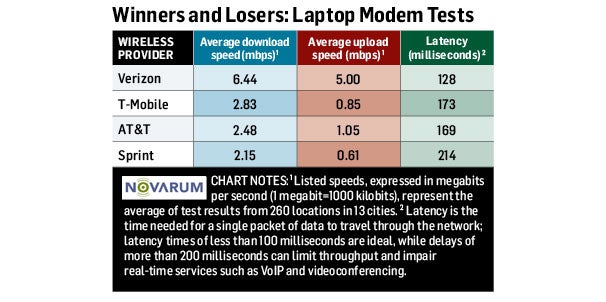
The phone works on Verizon’s new 4G (“LTE”) network, and it is FAST. Speed tests show that I’m getting between 10 and 20 Mbps down, and between 3 and 4 Mbps up. This is comparable to my home cable connection. Verizon has the fastest 4G network by far right now, but that may change as they start selling more 4G phones.

4G Speed Chart

The result is web browsing that is about the same experience as on my computer, except for the small screen.

Though small compared to a computer, the screen is larger, and the processor faster than on my old Droid, so the overall experience is much improved. The downside is that battery life seems limited, especially when using 4G. It doesn’t look like I’ll get a full day out of it if I use 4G a lot, but hopefully with a charger in my car it won’t be a problem.

February 2, 2011

Hybrid Hot Water?

Filed under: Computers, Tech & Science,Family Updates — Daryl @ 11:58 am

Geek alert. May not be interesting to the casual reader. Technical, gadget-type stuff.

We have had our current water heater for over 15 years (it came with the house). It’s inefficient and I’m concerned that it is ready to cause another flood. So I updated to the latest technology.

I got a GE Geospring water heater. It has a conventional electrical resistance water heater combined with a heat pump. Heat pumps are much more efficient — it uses less than half the electricity to heat water using the heat pump alone. However, a heat pump is slower, so the resistive part helps when demand is higher. There’s a nice animation here.

On the negative side it was about 3 times as expensive as a conventional electric water heater, but the savings in electricity should pay for the difference in about 3 years. So it’s really an investment.

On the plus side, the heat pump extracts heat from the environment to heat the water, so it will actually help to cool the garage (a little). A nice benefit in the summer, but not so useful right now while the outside temperature is in the 30s, and supposed to drop into the 20s tonight.

Took me most of the day to install. I’m OK at sweating (soldering) copper pipes, but it took me a while to figure out that one of the pipes had water dripping into it, and it’s almost impossible to solder a wet pipe.

Now, don’t you non-techy types wish you had observed the warning at the top? Is there anything much more boring than a water heater?

January 4, 2011

Core i7

Filed under: Computers, Tech & Science — Daryl @ 3:10 pm

If you’re not a geek or nerd, you should probably stop reading right now.

I upgraded my computer to an Intel Core i5 processor last year, and it’s been good. For Christmas I decided to help Derek upgrade his computer, and since he plays games and needs a fast CPU I planned to get him a Core i7. However, after doing some research he found that the Core i5 that I have is better for gaming, and the Core i7 is better for compiling and other tasks that I do a lot of.

So we swapped; I got the Core i7 and gave him my Core i5.

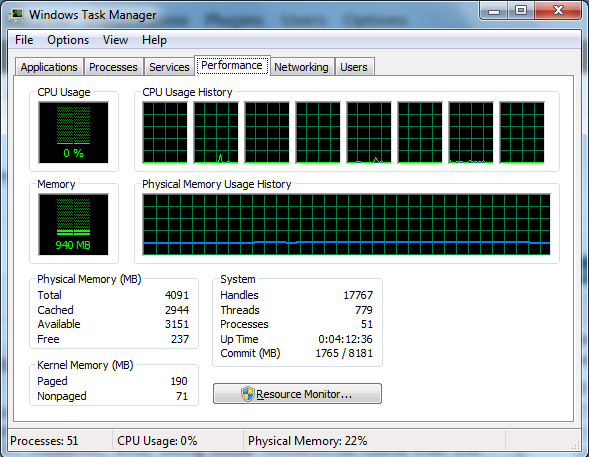
The main difference in the Core i5 and the i7 is that hyperthreading is enabled on the i7 and not on the i5. So with 4 physical cores, the i7 can sometimes run up to 8 separate threads. It is interesting to see the Task Manager Performance page, with 8 virtual processors:

8 CPUs

Derek learned that for gaming, most programs can’t take advantage of more than 4 cores, so the overhead of hyperthreading actually slows it down.

The Windows 7 performance rating only moved from 7.4 to 7.5 for CPU, and nothing else changed. And the difference is most likely just from clock speed — the new i7 runs a little faster than the i5 I did have. The performance rating apparently doesn’t use multiple cores, or at least not that many.

I’ll see over the next few days as I compile and do other processor-intensive programs if there is any noticeable difference.

December 17, 2010

Laser Capsulotomy

Filed under: Computers, Tech & Science,Family Updates — Daryl @ 9:38 am

6 years ago I had cataract surgery, with a replacement lens inserted. The improvement in vision was striking, as everything become suddenly much clearer and brighter.

Over the years, the natural capsule in which the lens is inserted has slowly opacified, to the extent that my vision had gradually returned to about where it was before I had cataract surgery. Glare from lights at night was so bad that driving was becoming dangerous. I had trouble reading my Kindle, and general visual acuity was poor.

Today I had a laser capsulotomy, a procedure in which they zap a laser through the lens and blast away the opacified capsule.

Already, an hour later, the improvement again is as striking as it was 6 years ago with the original cataract surgery, even while my eye is still somewhat dilated. The doctor said my vision should continue to improve for a while as the shreds of capsule dissipate over the next few weeks.

Isn’t modern medicine wonderful?

August 19, 2010

An Indulgence

Filed under: Computers, Tech & Science,Family Updates — Daryl @ 10:33 pm

After driving my Honda Odyssey for 10 years and 145,000 miles, I decided it was time for a new car. When you live many years with a car, you’re not aware of the gradual change as it ages — it still seems about like it did when it was new. But it’s not the car it was when you bought it. I was going to make a comment about spouses, but won’t. (Wait — I just did…) I still love my Odyssey, but…

I just bought a brand new 2010 Acura MDX Crossover SUV. Except for the entertainment package (DVD screen for rear seat passengers), I got all the bells and whistles. It’s the coolest car I’ve ever owned, or seen for that matter.

Some of the neat techy features include:
– Adaptive Cruise Control, where it uses radar to keep a safe distance from the car in front
– Collision Mitigation Braking System, where the same radar will warn you of an imminent collision and if necessary put on the brakes and tighten your seat belt.
– Blind Spot Information system, where it detects cars in the blind spot on either side.
– CDs are copied to a Hard Disk Drive, so you don’t need a disk changer.
– Ventilated seats in the front — air blows through tiny holes in the leather to keep you cool.

Plus all the “usual” stuff like Navigation, Bluetooth phone connection, back-up camera, etc.

It’s going to take me a while to figure everything out, but it will be lots of fun doing so.

The 2011’s will be out in a couple of months, but nothing has changed, and dealers were very ready to bargain to start clearing out the 2010 stock. So I probably shouldn’t have splurged, but if I keep it for 10 years I hope I will feel that I got my money’s worth.

July 21, 2010

Where would I be without Mozy?

Filed under: Computers, Tech & Science — Daryl @ 9:55 pm

My wonderful new Windows 7 computer crashed today. I’m not sure what happened, but I think one drive of my Software RAID setup started to fail, and instead of using the good drive to keep things correct, it used the failed drive and started trying to match the good drive to the failed one. All I know is that I have two supposedly mirrored drives that are quite different,and neither one has many of my important files. Windows will barely boot, many things don’t work, and it says it is not a “Genuine” copy.

What a mess! I’m going to have to wipe and reinstall. This time I’m going to use hardware RAID — it’s built into the motherboard, so it shouldn’t be hard.

Meanwhile, in the corruption, most of my data files are gone from both hard drives. All my Thunderbird email files, and most critically all my C++ files that I have spent thousands of hours creating.

Fortunately I set up a Mozy account a few months ago, and it is going to save my sanity.

Mozy is an online back-up utility. Every night around 2:00am all of the important, impossible to replace, files get backed up to Mozy’s server. I have about 26GB up there right now, and when I just checked, all those critical files I was so worried about are as fresh as last night.

Boy I thought that setting up a RAID 1 mirrored system would prevent data loss. It looks like in this case it just made it worse. Hopefully the next time, with hardware RAID, it will do better. But in any event I will continue to use Mozy.

June 20, 2010

Streaming Netflix

Filed under: Computers, Tech & Science,Family Updates — Daryl @ 9:59 am

We have had a Netflix account for several years, and generally like it a lot.

I quit Blockbuster because I got so frustrated with late fees — I would be charged a whole new rental period for being one day late on a return. With Netflix, you can keep a movie as long as you like and never get charged a late fee. Their selection is very large, and we usually get movies the day after they are sent.

The main drawback is lack of spontaneity. It’s Friday night, friends or family are over, and you want to watch a movie. But none of the ones you have on hand is appropriate for the audience. So you either end up going to Blockbuster anyway, or playing a game instead of watching a movie (which is probably a better alternative, but that’s a topic for another blog).

Now with Netflix streaming movies, we can choose something to watch on the spur of the moment, for no extra cost. If you have a Netflix account, you can instantly stream a movie or TV show directly to your computer, or with the right connections, to your TV.

Gisele, Derek and I are two-thirds of the way through the first season of “24”, which none of us had ever seen before. We have been watching 2-3 episodes a night for the past week. I was out of the country when Ken Burn’s “The Civil War” was shown, but now I’m watching that too.

Not everything is available. Recently released movies in particular are absent, and even the old ones are somewhat limited. But there are so many movies and TV shows that are available that I always can find something interesting to watch.

You can watch them on your computer if you want, but if you have a Wii, or Playstation 3 or several DVD players, you can stream them directly to your TV. We use our Wii, and the picture quality is very similar to DVD. It required a DVD to activate, but Netflix sent it for free.

I think this is the future of home movie watching, though I’m afraid that the movie studios will feel they aren’t being compensated well enough. We’ll have to see how it shakes out. For now, we can couch-potato as much as we want.
April 1, 2010

21st Century Internet

Filed under: Computers, Tech & Science — Daryl @ 12:24 pm

I have had Earthlink DSL for 10(?) years now. It was about the best I could get when I started, and over the years they have slowly increased the speed, from around 768 kbps (down) initially to about 2.5Mbps (320 kbps up) the last couple of years. However the price has stayed high ($50/month) and the speed is now relatively slow.

So I finally upgraded to cable (Cox). Wow — what a difference! I get 12Mbps down regularly, at times up to 20Mbps. Upload runs around 2Mbps, at times up to 3. And it costs slightly less than DSL at $47.

Maybe I can start streaming Netflix movies with reasonable quality now.

Here’s from a few minutes ago:

December 22, 2009

MBR Virus

Filed under: Computers, Tech & Science — Daryl @ 6:50 pm

I was fixing a computer a few days ago that was driving me crazy. When I began, it was full of malware; trojans, fake virus scanners and browser hijackers. I ran the usual scanner/cleaners and it seemed to be clean, but as soon as I started browsing it hijacked me to some malicious Russian website. Of course, that immediately downloaded new trojans, and I was back where I started.

I cleaned it again, using all the high-powered scanners I could find. Clean… until I started browsing again, and poof! I was in Russia.

I struggled with it for several hours, using esoteric process monitors, registry cleaners, etc., but I couldn’t find anything. Then I happened to stumble on a web forum where someone described the same problem, and had an explanation and solution.

It turned out to be a Master Boot Record (MBR) infection. That’s normally outside the operating system control, and not anyplace most scanners will check. MBR viruses used to be common with DOS and early Windows, but you don’t see them much anymore because Windows does a pretty good job of protecting the data there. However, it can happen and may be on the increase, as it can escape most scanners.

It’s easy to fix, once you know where it is (boot to the Recovery console and run fixmbr). Next time I’ll know what to look for!

« Newer Posts — Older Posts »

Powered by WordPress