News and Views From my kids accomplishments, to my heretical perspective of the world

June 19, 2013

Detached Retina

Filed under: Computers, Tech & Science,Family Updates — Daryl @ 10:30 pm

My mother just had surgery today for a detached retina.

I was at her house on Friday last week when she mentioned to me that she couldn’t see out of one side of her eye. There seemed to be a curtain over it.

That sounded like the classic symptom of a detaching retina, and I immediately called her ophthalmologist. They had her come in immediately. However, the doctor was unable to see any problems or damage to the retina. She referred Mom to a retina specialist, but the earliest they could get her in was the following Wednesday. The doctor seemed confident enough that it wasn’t a detached retina that waiting a few days wouldn’t hurt.

But on Tuesday Mom mentioned that the curtain had grown and was now covering almost half her vision in that eye. I immediately called the retina specialist and they had me bring her right in. This time the specialist could see that the retina was definitely detached. That was the bad news. The good news was that the detachment was in a quadrant that generally progresses slowly and there was no immediate danger of reaching the center of her vision (fovea centralis). So instead of going in that evening, he scheduled it for the following day, today, Wednesday.

So today Dale and I drove her 60 miles from her house to Sun City where the doctor performed surgery and fixed her retina.

The technique (Pneumatic Retinopexy) is interesting. There were two steps. First, he injected some gas into the eyeball. The gas bubble pushes against the retina and forces it back into place in the back of the eye. Then they shoot a laser to “weld” the retina into place. The gas bubble has to remain against the retina while it heals, so it’s important that she maintain her head in a specific orientation to bring that area of the retina up, so the bubble floats up against it. That means sleeping on her left side, which she hasn’t done in many years. She says it hurts her hips. Fortunately (?) she is taking Vicodin for the pain and so her hip shouldn’t bother her much tonight. She needs to continue this way for 7 days. Hopefully her hip will get used to it.

Prognosis is good. The surgeon said that as long as she lets that bubble do its work for a few days she should heal and recover pretty much all her vision, or at least all that macular degeneration has left her.

Now if they could have done that 55 years ago, I might enjoy watching 3D movies today.

April 24, 2013

The Genographic Project

Filed under: Computers, Tech & Science,Family Updates — Daryl @ 4:28 pm

National Geographic has a project called The Genographic Project. They are collecting DNA from people all over the world to “help answer fundamental questions about where humans originated and how we came to populate the Earth.” So far over a half million people have contributed DNA.

DNA

Gisele and I are also participating in this project. We sent them a DNA sample (collected from inside our cheeks). In return, they will analyze it and determine where our ancestors came from and what path they most likely followed out of Africa. They also measure the breakdown of our heritage, including the percent of Neanderthal ancestry.

Besides looking at general DNA composition, they focus on the Y-chromosome (for men) and mitochondrial chromosomes (for everyone). Since the Y chromosome gets passed down essentially unchanged from father to son, it is very useful for plotting paternal ancestry. Mitochondria, on the other hand, are contained in the mother’s egg cell and get passed down to all her children essentially unchanged, so those chromosomes can be used to plot maternal ancestry. In both cases “essentially unchanged” means that in each generation there are a few mutations that occur and get passed on and help further refine lineages.

Since my siblings all have the same Y-chromosome as I have (except Donna), and we all have the same mitochondrial DNA, my results will apply equally to them.

Here’s a video describing the project.

We just sent it in today and it takes several weeks to complete the analysis. Once we hear back I will post some results here.

Note: They do not test for any genetic diseases, etc.

March 26, 2013

No More Blu-ray

Filed under: Computers, Tech & Science,Opinion — Daryl @ 9:00 am

I got a Blu-ray player a couple of years ago for Christmas. The picture quality of Blu-ray is clearly better than DVD, especially on my big 65″ TV, but unless I think about it I don’t really notice it. But Blu-ray has one characteristic that makes it much inferior to DVD.

When I insert a Blu-ray disk, it takes a little longer to start up. That’s OK, it’s just a few seconds. But then almost every Blu-ray disk starts playing previews, one after another, and most of the controls are locked out. You can’t cut directly to the menu, you can’t skip to the next preview, and in some cases you can’t even fast-forward through the preview. You have to just let them play, one after another, for several minutes.

I find this extremely frustrating. Previews of a movie tend to spoil that movie for me when I watch it later. I want to go in knowing as little of the plot as possible. When I go see movies in a theater I usually wait outside the theater until the previews have finished playing. I know, it’s a little bit anal, but I like it that way.

I’ll do that in a theater. But in my home with my own equipment and a disk that I have paid money to buy or rent, I feel that I should be able to watch the movie when I want. Leave the previews there on the menu as an option for those who want to watch them, but let me skip them and cut directly to the movie.

So I cancelled my Netflix Blu-ray option and am going back to plain DVD for all my movies. With a DVD I can always skip the previews, or some people even copy it and strip out the previews, FBI warning, etc.( though of course I would never do anything of such questionable legality). I’ll stick with DVDs or streaming until I can get a Blu-ray player that will let me control the disc instead of vice-versa. Maybe I’ll find one in Taiwan…

Image

March 14, 2013

Happy Pi Day!

Filed under: Computers, Tech & Science — Daryl @ 11:33 am

January 10, 2013

Up to the rooftop

Filed under: Computers, Tech & Science — Daryl @ 12:21 pm

I flew my quadricopter up to take a quick look at the solar panels. I left this in full resolution when uploading to YouTube. Set it to highest quality when viewing to see how the original looks.

January 9, 2013

Quadricopter!

Filed under: Computers, Tech & Science — Daryl @ 2:09 pm

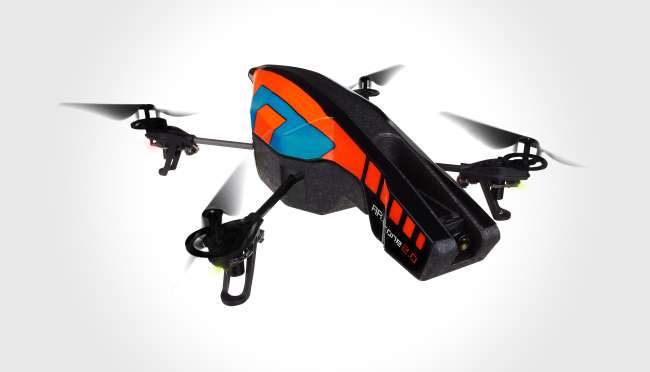
Here’s my newest toy; a quadricopter:
Quadricopter

I got it yesterday from Brookstone

It’s a remote control helicopter with 4 rotors that work together to give amazing stability and control. It can be easily controlled with either an iPad, iPhone or Android tablet or phone, indoors or out. There’s one mode where you just tilt the tablet or phone to have the copter move that way, easily getting it to fly in circles or hover motionless.

It has two cameras; a 720 HD front-facing camera and a lower res down-facing. Live video can be viewed on the tablet or phone, and can be recorded. The down-facing camera is also used to help keep it hovering in place, along with sonar sensors to keep it at a constant altitude.

It’s a neat toy, and I’ll try to post some videos I’ve taken with it later on. I’m still just learning the fine details of control.

December 10, 2012

Goodbye Verizon

Filed under: Computers, Tech & Science,Opinion — Daryl @ 12:36 pm

Verizon is still ranked number one for coverage in the US, but it’s becoming very expensive. We pay about $220 a month for 4 phones, one of which isn’t even “smart”.

The rest of my family is going to stay with Verizon for now, but I’m in the process of jumping ship. I bought the new Google Nexus 4 phone, unlocked, for $350 direct from Google. That may seem expensive when you are used to buying subsidized phones directly from the wireless company, but for an unlocked phone it’s very cheap. Verizon would sell an equivalent phone without a contract for $600 or more, and at least $250 with a 2-year contract.

The best part is that I got a month-to-month no-contract connection with T-Mobile for just $30/month. That includes unlimited data and text, and 100 minutes of voice.

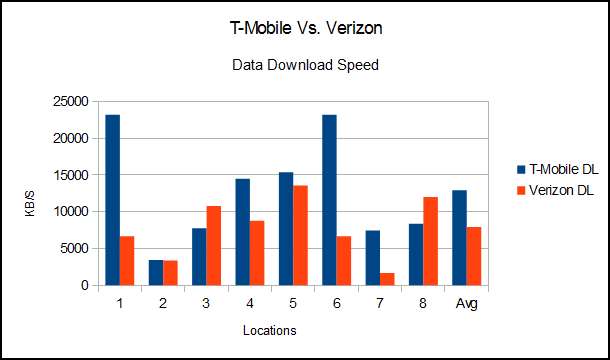
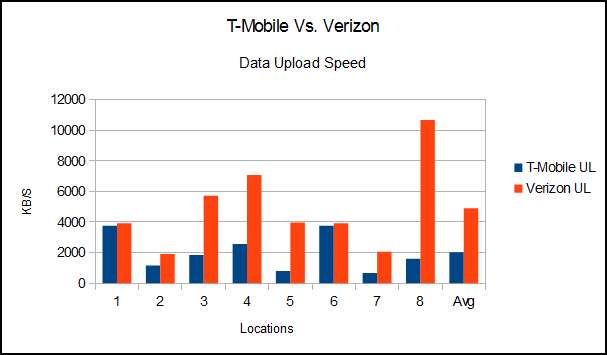
On the potential downside, the phone doesn’t support LTE, the latest high speed data connection. But it does support “HSPA+“, an enhanced 3G service that is supposed to be pretty fast. I temporarily have both phones, so I did some comparisons using SpeedTest at a few locations around town. Here are the results:

Download Speed Graph

Download Speed Graph

Surprisingly, in most of the locations around the East Valley (Tempe, Chandler, Mesa, Gilbert) T-Mobile download was faster than Verizon. Uploads were all slower on T-Mobile, but that is much less of a concern for me.

A couple of years ago when I bought my Verizon Thunderbolt, it was the first Verizon LTE phone on the market, and the LTE bandwidth was all available for a few users. At that time I was regularly getting 20 MB/S download speeds. But (I assume) as more and more people are using LTE, it is getting crowded and therefore slower.

Tomorrow I’m taking a trip half-way to Payson, so I’ll see how coverage is outside the metropolitan area. I assume that Verizon will be better, but that’s what I assumed for the local speed test, so I’ll wait and see. I also haven’t done much voice quality testing since I haven’t ported my number over yet. Funny how the most important thing to me about my phone is not using it as a phone.

November 29, 2012

Highest owner satisfaction

Filed under: Computers, Tech & Science,Opinion — Daryl @ 3:04 pm

Consumer Reports just published the results of their car ownership survey, and for two years in a row the Chevy Volt has the highest rate of “Yes” answers to the question “Would you buy this car again?”

92% of Volt owners said “Yes!”, just nosing out the Corvette and Porsche 911 at 91%. I’m certainly in that 92%.

November 13, 2012

Breaking Even

Filed under: Computers, Tech & Science,Family Updates — Daryl @ 8:47 am

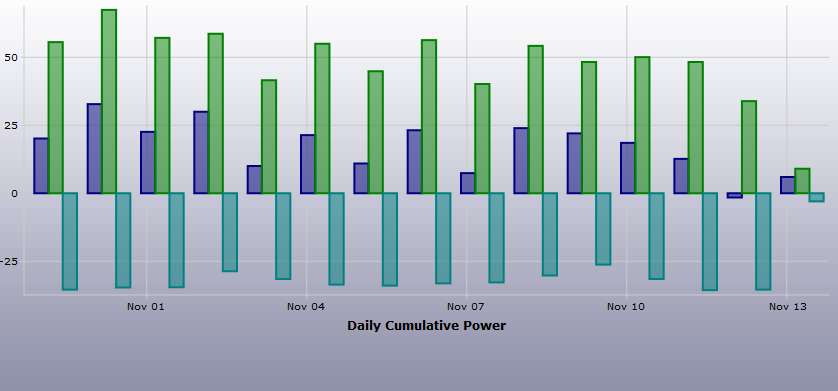
Yesterday I produced more electricity than I consumed for the first time since spring. At the end of the day I was about 1.5 kWh in the black, having produced 35.5 and consumed 34.

I would have broken even several times over the past couple of weeks (as the need for air conditioning has plummeted) except for the Volt. I typically use 5 to 20 kWh driving around town, but I didn’t go anywhere yesterday.

There is a small window in the fall where I can hope to make more than I use, but as the days get shorter and we start heating the house, these days will be few. Spring is typically better since the days get longer while the weather remains mild.

kWh
The turquoise bars show generated power, green is total consumed, and dark blue is net power bought from the power company. You can see the cloudy days, where the turquoise bar is shorter.

November 5, 2012

Windows 8: First Impressions

Filed under: Computers, Tech & Science — Daryl @ 3:01 pm

With a $40 price I felt it was worth it to try Windows 8. Gisele’s computer was still running XP, and was working fine, but since the rest of the computers in the family already have Windows 7, it seemed like the logical candidate. So yesterday I downloaded a copy of Windows 8 and set to work.

INSTALLATION:
The installation didn’t go easily. At first I tried to install from within XP. It aborted every time, sometimes after a half-hour or so when it seemed like it should be nearly done, and sometimes it wouldn’t even start. There are lots and lots of complaints on the web about how poorly the installer works, and how it doesn’t give any explanation about what went wrong. Hopefully Microsoft will fix this before too many people try to upgrade.

So I put a new hard drive in her computer, burned an installation DVD and installed from scratch. That went flawlessly. It found the network printer, and installed working drivers for that and the video card, etc. Everything except Gisele’s Chinese writing tablet are working fine.

FIRST IMPRESSIONS:
Where’s the start button? Where’s the desktop? How do I do anything?
Touchscreen UI
Microsoft wanted a single version of Windows that would run on a desktop, a tablet and a phone. The result is a weird mishmash of modes. After a while I figured out how to get to the old desktop mode, with icons and the bar along the bottom, but there is no start button on the bar. All the stuff that you normally access through that start button (programs, control panel, printers, documents, help, search, etc. are now spread out in different not very intuitive locations. I quickly found and installed a free third-party start button that behaves the same as the standard XP start button and now feel much more at home.

The touchscreen mode is pretty useless without a touch screen, though you can click on the huge icons the same as if you were touching them on a tablet. Microsoft loaded it with a bunch of their apps, which at first glance seem somewhat useful — Weather, Travel, News, Sports, etc. But when you open them up there are big ads that frequently change. I immediately removed all of those apps. I hate ads

Once you get the desktop configured and add a start button, it looks and feels a lot like Windows 7.

My first impression is that Microsoft made a mistake by trying to integrate a touchscreen UI with a desktop UI. If you’re on a computer, the touch screen interface is pretty useless, but necessary for a few functions (though I hope the Start Button I installed will remove that necessity). If you are on a tablet, then the desktop is probably too small to use without a mouse and keyboard. The only case I can think of where you might really want them integrated is on a convertible tablet like the Surface. And even then I think it should automatically switch UI based on whether you are using it as a tablet or if you have a keyboard connected.

I do have to say that it feels snappy and responsive. I booted from POST to login in about 30 seconds, which is better than her computer did with XP. But the snappiness is probably mostly because it is a clean install without several years accumulation of crapware.

Gisele will continue to be the guinea pig for this, but I’ll play with it too and I may publish an update if impressions change after using the UI for a while. Meanwhile I would say that if you have Windows 7, don’t bother to “upgrade”.

« Newer Posts — Older Posts »

Powered by WordPress