News and Views From my kids accomplishments, to my heretical perspective of the world

December 21, 2008

Short Day

Filed under: Computers, Tech & Science — Daryl @ 8:45 pm

Today is the Winter Solstice, the shortest day of the year.

On the equator the day is 12 hours long, any day of the year.
In Tempe, Dallas and Pasadena, today is about 10 hours long.
In Boise, Idaho it’s about 9 hours long.
In Anchorage it’s 5 1/2 hours long.
In Fairbanks it’s a little less than 4 hours (from about 11:00am to about 2:40pm).
At the north pole, there is only one day and it’s 6 months long, but today the day is zero hours long.

Thanks to the US Navy for the data.

December 14, 2008

Malware Bytes!

Filed under: Computers, Tech & Science — Daryl @ 2:05 pm

“It sure does”, you must be thinking. Viruses, trojans, spyware, adware, rootkits, all this malicious software sneaking on to your computer really bites.

My current favorite malware remover is “Malwarebytes“. It finds and removes things that other programs have trouble with. I’ve even used it to remove the Vundo trojan, which is one of the most difficult.

Where I used to recommend that people install and frequently run Spybot or AdAware, I am now recommending that they run Malwarebytes instead. The free version is all I’ve used. They have a version you can buy that runs continually in the background scanning files, just like AVG, McAfee or Norton do, but I haven’t tried it and so cannot recommend it.

Go to their web site and click on the ‘Download Now” link on the left side of the screen.

November 11, 2008

Another fun waste of time

Filed under: Computers, Tech & Science — Daryl @ 11:02 pm

This is pretty good. You can waste a lot of time with it.

October 26, 2008

Don’t blame me, I didn’t send it!

Filed under: Computers, Tech & Science — Daryl @ 10:53 am

Suddenly this morning I started receiving “Undeliverable” messages from email servers all around the world, many of them complaining that I’m sending spam, or sending to expired email addresses. The messages were coming in at several per minute, flooding my inbox. In a half hour I had a few hundred.

One’s first thought when this happens might be that perhaps your own computer has been compromised with a trojan, and is sending out spam at a huge rate. But that’s almost never the case. Spammers do compromise innocent computers with trojans, and they do force them to send out spam, but they never use the correct return address.

When email was invented it was primarily for University and Defense Department inter-office communication. It was naively assumed that someone was who they really said they were, and so there were no safeguards against “spoofing”. The spammers and con-artists have taken advantage of this, and send out their messages with bogus return addresses. The return addresses are harvested from various sources; it’s very hard to keep your email address off these lists.

Typically they will use one return address for a day or so on one or a few computers, and then as the spam filters adjust they will move on to another. So I know that if I just sit tight this flood should be over by tomorrow.

But fortunately the compromised email address is one of my “throw-away” addresses that I don’t really need. I create these and use them in cases where the address is likely to be made public.

I disabled that address and like magic the emails stopped.

The computer/internet world is a jungle, with parasites and predators lurking everywhere. Compromised computers can be made to send out millions of spam messages at little or no cost, and if one in a million recipients fall for the scam it is worth it.

October 14, 2008

New BlackBerry Flip

Filed under: Computers, Tech & Science — Daryl @ 9:35 pm

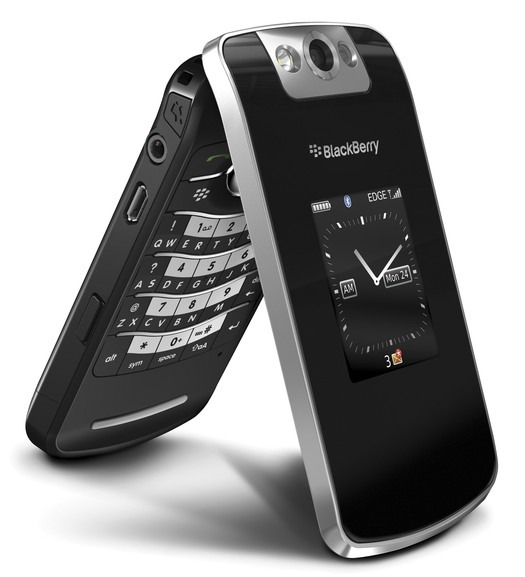
I got another phone yesterday, the new BlackBerry Flip.

BlackBerry 8220

It’s a full-featured BlackBerry phone in a flip (clamshell) format — the first flip BlackBerry on the market.

I used to have a Kyocera 7135 flip Palm phone. It seemed small when I bought it, but this one is much smaller, and very light.

I think the iPhone is probably a better all-around toy and gadget, but this one flips, and is much lighter and smaller than the iPhone, all features that are important to me.

I think I’m going to like this, and probably keep it, but I’ve got 14 days to be sure.

September 18, 2008

Chevy Volt

Filed under: Computers, Tech & Science — Daryl @ 10:32 am

Devon’s Toyota Prius is a hybrid car, using both electricity and gas to drive the wheels. As revolutionary as that is, GM is planning to push the technology envelope even further with the Chevy Volt, due out in 2010.

Lithium Ion batteries will drive the car for up to about 40 miles. As the batteries get too low, a small gas engine will start up. The purpose of the gas engine is solely to recharge the batteries; it doesn’t drive the wheels at all.

If you plug the car in each night, and commute less than 40 miles a day, round trip, you will never have to buy gas. If your employer lets you plug in at the office, you could commute up to 80 miles round trip and never buy gas. But even if your commute is longer, or if you want to take a long trip, the gas engine will extend the range to 300 – 400 miles.

At the current price of electricity and gasoline, your driving cost will drop from around 12 cents/mile to around 2 cents/mile (YMMV). The increased demand on the power network isn’t expected to be a problem as most people would recharge at night when demand is much lower. Maintenance on your car should decrease too, as electric motors require much less maintenance than gas engines.

It’s a very promising, intriguing technology. Initially they will likely be expensive (up to $40K), but as both presidential candidates are proposing tax breaks to encourage the development of such technology, it’s likely your net cost would be much lower.

Toyota and other companies are working on similar cars, but it looks like GM is in the lead, with the most radical approach.

There have been half-hearted attempts at electric cars in the past (GM’s EV1), and there are projects trying to develop hydrogen fuel cells. These may have potential in 10 or 15 years, but for now some kind of plug-in hybrid seems like the best next step in automobile technology, and it looks like they are finally going to happen.

More here.

September 12, 2008

My Next TV?

Filed under: Computers, Tech & Science — Daryl @ 10:36 am

Life Wall TV

Might be a little expensive…

August 24, 2008

Anatomy of a Scam

Filed under: Computers, Tech & Science — Daryl @ 10:49 pm

This is a very interesting investigation into a very sophisticated computer scam. Clicking on the wrong link can get you into a lot of trouble if you’re not careful!

August 14, 2008

Software Suggestions

Filed under: Computers, Tech & Science — Daryl @ 11:11 am

Here are some of the free programs I’ve been using.

Firefox
Firefox has had the 3.0 version (now 3.01) out for a few weeks. It looks pretty stable, with a couple of new features. For one thing, it’s supposed to use less memory, and release memory better when it is done using it. This seems to be true from my experience. Another enhancement is in page zoom. With Firefox you could always hold the Control key and roll the mouse scroll button to zoom in or out of a page. Before it would only zoom the text, but now it also zooms the pictures too. Handy for taking a closer look at a picture. The picture zoom option can be turned off if you want, so it can behave like it did before.

AVG
AVG has also had version 8.0 out for several weeks. I recommended the upgrade several blogs ago, but I have some reservations now. It seems that if any of your hard drives are formatted with FAT32 the new AVG doesn’t seem to work so well. I have one FAT32 drive on my computer, and a full daily scan takes about 8 hours. Anyway, the protection seems to be better than before, but this is a little inconvenient.

Encryption
TrueCrypt is a very nice free data encryption program. You can create an encrypted file that once “mounted” looks just like another hard drive. Once you unmount it, it is almost completely unreadable. I guess the FBI or NSA could probably eventually crack it, but it’s pretty secure. What’s more, you can have it set up with two passwords. If you use one password it will display one set of data, while the other password will display another set. This way you could hide all your banking information under one password, but put fake data under the other. If a bad guy holds a gun to your head and makes you give him the password, he will only get the fake data. Or for another example, US Immigration has claimed the right to examine your laptop computer when you bring it in the country. This could also be a way to keep what’s private, private and only reveal to them the fake stuff.

Photo Copier
If you have a scanner and printer, but lost or never got a photocopy program with it, PhotoCopier is a nice free alternative. It’s pretty basic with only a few adjustments, but works quite well.

CD/DVD Burner
Similarly, if you have a CD or DVD burner, but lost the burning software that came with it, CDBurnerXP is a good free alternative. It’s not quite Nero, but it’s pretty good.

Calendar
If you want a calendar, I know of three free options. Outlook is probably the best, most full-featured calendar available, but it’s definitely not free. However, Lightning is. Lightning is made to integrate into the Thunderbird email client, while Sunbird is an identical stand-alone version. Another free option is to download the Palm Desktop program. This is actually designed to synchronize with your Palm handheld, but it works fine as a stand-alone calendar, event manager, and contact manager. It’s a little more mature than Lightning, too. And the final option is Google Calendar. This has the advantage of being online, so you can access if from anywhere. Plus, if you collaborate with other people you can see all the calendars side by side and determine when you are all free for a meeting. I have not used Google Calendar, so I am only telling what I have heard.

DVD Copier
If you want to make a backup copy of your DVD (just in case the dog chews up the original — I’m not advocating piracy here!), I have used DVDShrink for a years. It will remove region restrictions and most copy-protection schemes. Plus, it can compress a two-layer DVD onto a cheap single layer DVD, so you don’t have to buy a dual layer burner and expensive dual-layer disks. The compression works very well; I’ve never noticed any image degradation. I don’t think they have a Blu-Ray version yet. If you have Nero installed, it will integrate with it and burn directly. If not, it will create the files that you can burn with CDBurnerXP or another program.

Backup
Cobian Backup program is an excellent free data backup program. It can be set to run automatically every day, or whenever you like. The only problem I have seen is that even though I have set it to only keep a limited number of backup copies, they seem to keep accumulating, so periodically I have to go in and delete old ones. Otherwise it’s an excellent program. I back up critical data on my C drive to my D drive, and vice-versa. So if either drive fails I should have a backup on the other. Of course if the computer gets stolen I would be out of luck… You can also back up to an FTP location.

PDF Reader
I’ve mentioned Foxit PDF reader before. If you tried it and had problems, try the latest version. It is much faster than Adobe Reader, and uses much less system resources.

Shop Safe
This is an option that my Credit Union offers. I’m pretty sure other banks have similar options. When I want to buy something online, the ShopSafe program will generate a one-time credit card number, limited to the amount I tell it. The charges are applied to my regular credit card, but the number is useless for future purchases. This takes most of the worry out of giving out your credit card number on the internet.

Image Viewer/Manipulator
The FastStone image viewer is an excellent image browser, viewer, slideshow program. What’s more, it has edit capabilities, both single and batch. Do you have a lot of photos you want to upload to your gallery, but they are all high resolution straight from your camera? Select the pictures you want to resize and FastStone will do them all in one shot. I used to use ACDSee, but FastStone is better and free.

Disk Usage
TreeSize will go through your whole hard drive and tell you how much space each folder is using. I find this useful when I start to run out of space. I can find out what the space is being used for and decide what to delete.

Well, that’s enough for now. What did I miss?
July 9, 2008

Did your internet go down this morning?

Filed under: Computers, Tech & Science — Daryl @ 5:39 pm

Microsoft released some windows patches last night that don’t cooperate well with ZoneAlarm firewall software. The result was that millions of people woke up this morning and were unable to access the internet.

If this happened to you, here are some workarounds.

(Of course, this is assuming you were at least able to connect to read this…)

« Newer Posts — Older Posts »

Powered by WordPress